General Deposit Steps
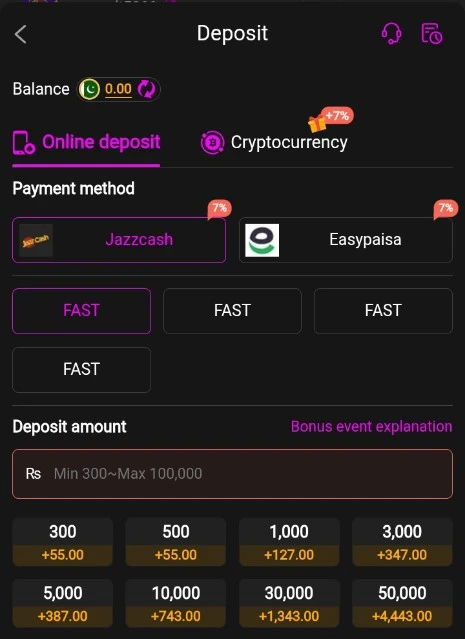
- Open the ALI786 Game app and log in to your account.
- Go to the Wallet, Deposit, or Recharge section (usually in the bottom menu or profile area).
- Select an available payment method: EasyPaisa or JazzCash.
- Enter the deposit amount (check the app for the current minimum — these are often low, such as a few hundred PKR on similar apps).
- Follow the on-screen instructions:
- In-app redirect (preferred when available): The app may open EasyPaisa/JazzCash or a payment confirmation page. Approve the payment with your PIN/OTP.
- Manual transfer: Note the account number or details shown in the app (screenshot them), then open your EasyPaisa or JazzCash app (or dial *786#), choose Send Money, enter the exact details and amount, and complete the transfer. Note the transaction ID.
- Confirm the transaction and return to the ALI786 app. Your balance should update within a few minutes (sometimes longer during peak times).
- Keep the transaction reference/ID for your records.
Important Safety Tips
- Only use payment details displayed inside the official ALI786 app or its legitimate platform. Never send money to a random person, agent, or number claimed via social media, WhatsApp, or unofficial sites.
- Use your own verified EasyPaisa or JazzCash account that matches your game account details where required.
- Double-check the amount, account number, and all details before confirming.
- Start with a small test deposit if you are new.
- Real-money games involve risk of loss; there are no guaranteed wins. Treat this as entertainment only and deposit only what you can afford to lose.
- Payment methods, minimums, fees, and exact steps can change — always check the current information in the app.
Similar Pakistani gaming apps follow nearly identical EasyPaisa/JazzCash processes (in-app redirect or manual transfer with transaction ID submission if needed). If the deposit does not appear, contact the app’s official support with your transaction ID rather than third-party “agents.”
Download and use only the official APK from a trusted source associated with the platform, and enable security features on your account.