Step-by-Step Withdrawal Process
- Log in to your ALI786 Game account.
- Open the Wallet section.
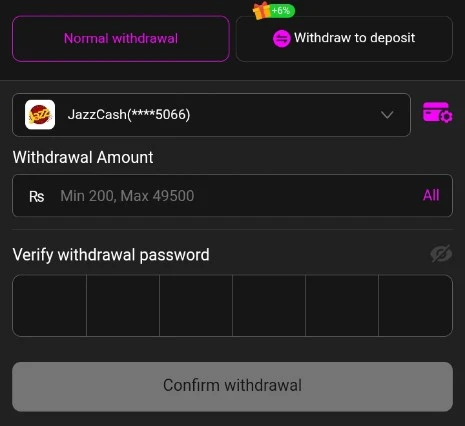
- Tap Withdraw (or Cash Out / Withdraw Money).
- Select a withdrawal method — usually EasyPaisa or JazzCash.
- Enter the required details:
- Your EasyPaisa or JazzCash mobile number (must match the one linked to your account where required)
- Sometimes account holder name
- Enter the withdrawal amount (check the current minimum limit shown in the app).
- Review all the details carefully.
- Submit the request and note the transaction/reference ID.
- Wait for processing — funds usually arrive in your EasyPaisa or JazzCash wallet within minutes to a few hours (can take longer during peak times or if verification is needed).
Important Tips for Successful Withdrawals
- Make sure your EasyPaisa or JazzCash account is in your own name and preferably CNIC-verified. Name mismatches are a common reason for delays or failures.
- Check the minimum withdrawal amount and any bonus wagering requirements before requesting.
- Use the same mobile number you registered with, if the app requires it.
- Never pay any extra “fee” or send money to a third party who claims they can process or unlock your withdrawal.
- Keep your transaction ID and contact official in-app support only if the withdrawal stays pending longer than expected.
- Processing times can vary — always check the status inside the app first.
The exact fields, limits, and options can change with app updates, so always follow the instructions shown on the withdrawal screen in your ALI786 account.